The Tracking Lifecycle
This page follows one click from tap to attributed revenue. Understanding this journey explains almost everything else in Synaptyx.
Stage 1 — The click arrives
A visitor opens https://<your-domain>/t/<campaignId>?sub1=…. Before anything is
recorded, the request passes a few gates:
| Gate | What it does |
|---|---|
| Domain check | Confirms this campaign is allowed on the domain it was requested on. |
| Rate limiting | Throttles abusive bursts from a single source. |
| Paused check | A paused campaign stops serving and doesn’t record. |
| Bot filter | Drops known bots, crawlers, and anything matching your blocklists — these are never recorded. |
Bots are dropped; suspicious humans are flagged. The hard bot filter removes obvious non-humans entirely. Everything that passes is then scored for fraud and recorded with that score — so you keep the data and decide what to do with it. See Fraud & Bot Detection.
Stage 2 — The visitor is identified & scored
For clicks that pass, Synaptyx enriches the record with:
- Geo — country and city.
- Device, OS, browser.
- Traffic source — classified into
paid/organic/social/ai/referral/email/direct. - A fraud score — see Fraud & Bot Detection.
- Sub-IDs (
sub1–sub30), ad-click IDs (gclid,fbclid,ttclid), UTMs, referrer, and an optional click cost.
Stage 3 — Routing decides the destination
The campaign’s flow is evaluated to pick where this specific visitor goes. The flow can branch on geo, device, OS, browser, sub-IDs, bot status, schedule (dayparting), offer caps, site uptime, and percentage splits — and it can hand the decision to an AI Smart Rotator.
The result is one of:
- a landing page URL (the visitor sees a pre-sell page first), or
- an offer URL (the visitor goes straight to the product), or
- a safe fallback if nothing resolves.
See Campaigns & Flows → Flow Engine for the exact evaluation rules.
Stage 4 — The redirect (fast & non-blocking)
Synaptyx returns an HTTP 302 redirect to the chosen URL, with:
- the
clickidappended to the URL (so the next page can carry it forward), - a
synaptyx_cidparameter and anX-Click-Idresponse header.
The click itself is recorded in the background, so the visitor never waits.
Location: https://offer.example.com/?clickid=AbC123…&synaptyx_cid=AbC123…
X-Click-Id: AbC123…
Carry the clickid forward. If you route through a landing page, its
call-to-action link must pass ?clickid=… on to the offer (enable
“Forward query params” on the Landing node, or template it into the CTA). Without
the click ID on the final destination, the conversion can’t be attributed.
Stage 5 — Pixels enrich the journey (optional)
If you install the pixel snippet on your landing or thank-you page, it fires events back to Synaptyx via a beacon (page view, add-to-cart, custom goals). Pixels:
- stitch the visitor’s on-page behavior to the click,
- power funnel analytics and audiences,
- add client-side bot signals,
- are adblock-resistant by design.
See Dashboard → Pixels.
Stage 6 — The conversion
When the visitor does something valuable, a conversion is created. There are two
independent paths into the same Conversion table:
CPA postback (affiliate offers)
A CPA network calls your conversion URL server-to-server:
GET /api/conversion?click_id=AbC123…&payout=1.50&status=approvedSynaptyx accepts the click ID under many common parameter names (click_id,
cid, subid, transaction_id, aff_sub, …), maps the network’s status to a
normalized one, de-duplicates repeats, and creates the conversion attributed to
that click. Optional defenses: a shared postback secret (&s=…) and an IP
allowlist.
Stage 7 — Attribution & fan-out
Once a conversion is created, Synaptyx ties it to the original click — and therefore to the ad, creative, geo, device, and sub-IDs behind it. Then it fans out fire-and-forget side effects:
Each of these is non-blocking, so a slow third party never holds up your conversion recording. Failed outbound postbacks are retried automatically.
Stage 8 — You see it
The conversion now appears across the product within seconds:
- Live Logs — the real-time stream.
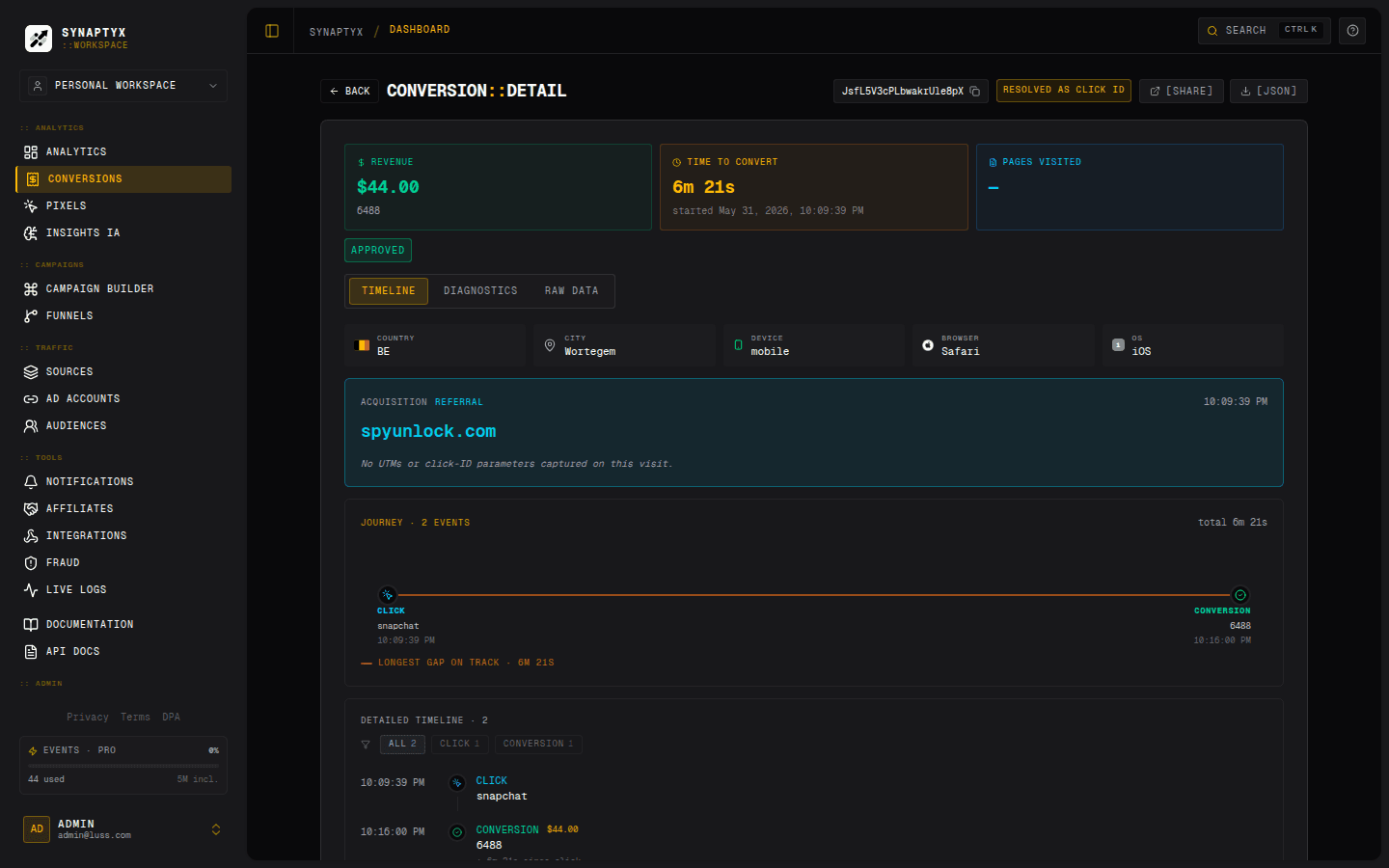
- Conversions — the searchable list, drill into a single journey.
- Analytics — EPC, CR, ROI, broken down by any dimension.
- REST API / MCP — the same data, programmatically.
The journey view stitches the whole lifecycle back together for one click — acquisition, the timeline of events, and the conversion with its revenue:
Two paths, one table
It’s worth restating because it confuses newcomers: CPA postbacks and revenue webhooks are two independent ways conversions get created. CPA conversions are tied to an offer; revenue conversions are tied to a revenue source. The dashboard and API merge them transparently, so you see one unified conversion stream.