Node Reference
This is the complete catalogue of builder nodes. Each one does a single job. Wire them together and you get a routing flow. For every node you get: what it’s for, how to set it up, what it connects to, and a plain example.
Nodes marked 🔒 Pro require a Pro or Scale plan. The rest work on any plan.
Every node below is dragged in from the element palette on the right of the builder canvas, then wired into the flow:
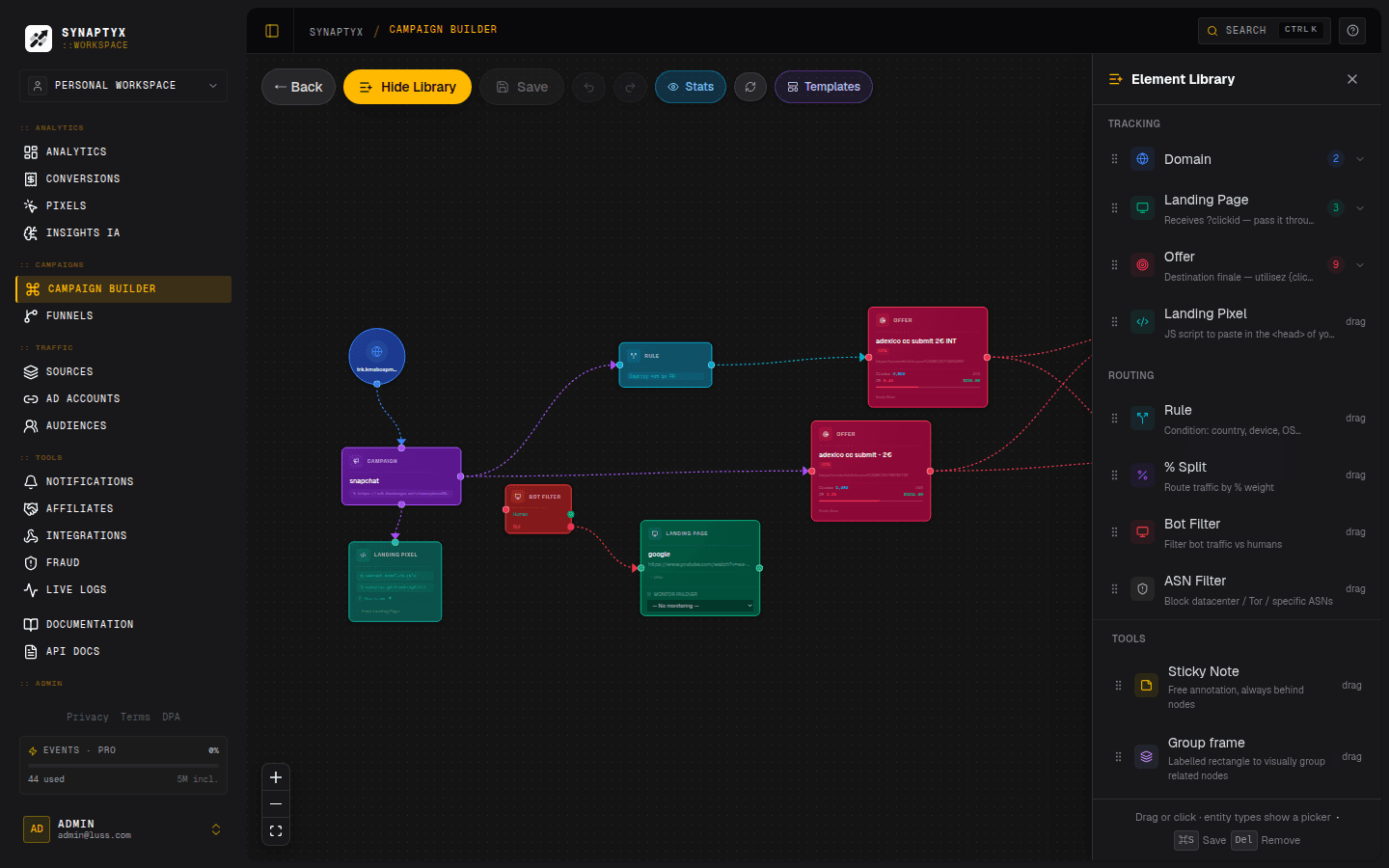
At a glance
| Node | Group | Job | Plan |
|---|---|---|---|
| Domain | Tracking | The hostname your link lives on | Any |
| Campaign | Tracking | The root of every flow | Any |
| Landing Page | Tracking | A pre-sell page before the offer | Any |
| Offer | Tracking | The final money destination | Any |
| Landing Pixel | Tracking | Capture events from your page | Any |
| Rule | Routing | Branch by geo / device / ASN / sub-ID… | 🔒 Pro |
| % Split | Routing | Weighted A/B/n test (sticky-per-visitor) | 🔒 Pro |
| Bot Filter | Routing | Fork humans vs. bots | 🔒 Pro |
| ASN Filter | Routing | Block datacenter / Tor / custom ASNs | 🔒 Pro |
| Smart Link | Routing | Geo × Device matrix in one node | 🔒 Pro |
| Dayparting | Routing | Route by day / time (any timezone) | 🔒 Pro |
| Offer Cap | Routing | Limit conversions per offer | 🔒 Pro |
| Visitor Cap | Routing | Frequency-cap per visitor | 🔒 Pro |
| Smart Rotator | Routing | AI auto-optimization | 🔒 Pro |
| Discord | Notify | Ping a Discord channel on conversion | Any |
| Slack | Notify | Post to a Slack channel on conversion | Any |
| Telegram | Notify | Message a Telegram chat on conversion | Any |
| S2S Postback | Notify | Server-to-server callback | Any |
| Push Web | Notify | Browser push notification | Any |
| CPA Network | Other | Represent an upstream network | Any |
| Traffic Source | Other | Represent your ad source | Any |
| Group | Other | A visual frame around nodes | Any |
| Sticky Note | Other | A canvas annotation | Any |
Tracking & structure nodes
Domain
The custom hostname your tracking link lives on. It sets the <domain> in
https://<domain>/t/<id>.
| Configure | Pick a verified domain from your library (the name). |
| Connects to | Campaign only. |
| Default | The special __default__ value uses the platform’s shared tracking host — no setup needed. |
Example: route this campaign through
trk.mystore.cominstead of the shared domain. See Custom Domains.
Campaign
The root of the flow. Every graph has exactly one, created automatically, and it can’t be deleted. Its outgoing connections become the campaign’s default route and top-level rules.
| Configure | A name. |
| Connects to | Landing, Offer, or any Routing node. |
Example: the “Nutra — France” campaign whose
/t/link you paste into your ad manager.
Landing Page
An intermediate page shown before the offer — an advertorial, a quiz, a pre-sell. The visitor sees this first, then clicks through to the offer.
| Configure | Name · URL · Forward query params? (pass UTMs/subs through) · optional Monitor failover. |
| Connects to | Offer (and an optional failover handle → a fallback Landing). |
| At runtime | The visitor is redirected to the landing URL with ?clickid appended. The page’s CTA must carry that clickid on to the offer. |
Your landing page’s button/link must forward ?clickid=… to the offer, or the
conversion can’t be attributed. Turn on Forward query params and/or template the
click ID into your CTA.
Monitor failover: link a Landing to a monitored site. If that site goes down, traffic automatically routes to a fallback Landing through the failover handle — so a dead lander never burns your traffic.
Example: an advertorial that warms the visitor up before sending them to the weight-loss offer; if the advertorial host is down, fall back to a simpler page.
Offer
The final, monetized destination. It ends the routing flow.
| Configure | Name · URL (supports macros like ?cid={clickid}) · default payout · payout type (CPA / CPL / RevShare / Multi) · per-event handles. |
| Connects to | Notification nodes only. |
| At runtime | Macros in the URL are expanded, configured params and non-empty sub-IDs are appended, then the visitor is redirected. |
Example: “ClickBank weight-loss offer, $1.50/lead, URL
https://offer.com/?cid={clickid}&s1={sub1}.”
Offers with multiple payout events expose a handle per event, so you can wire a different notification to each (e.g. ping Discord on a sale but not on a trial).
Landing Pixel
A JavaScript snippet you paste into your landing page’s <head> to capture
on-page events (page view, add-to-cart, custom goals). It’s a display/config node —
it represents the pixel attached to a Landing, not a routing step.
| Configure | Allowed domains (one per line) — the referer allowlist the pixel beacon must match. |
| Connects from | A Landing Page. |
Example: track add-to-cart events fired from your own checkout page so they appear in funnels and audiences. See Pixels.
Routing nodes 🔒 Pro
These are the decision-makers. They sit between the Campaign and your destinations and branch traffic based on the visitor.
Rule
A conditional branch. Only visitors matching all of the rule’s conditions take this path.
| Geo / device fields | country, city, device, os, browser. |
| Network fields | asn (number), as_organization (ISP name), is_datacenter, is_tor. |
| Traffic fields | traffic_source, source_category, accept_language, referer. |
| Sub-ID fields | sub1–sub30. |
| String operators | in, not in, equals, not equals, contains, starts with, regex. |
| Numeric operators (asn / numeric subs) | between (min,max), greater than, less than. |
| Connects to | Landing, Offer, or another Routing node (rules nest — child conditions add to the parent’s). |
Example: If
country in FR, BE, CH→ send to the French lander. Add a second conditiondevice = mobileto make it French mobile visitors only. Or block a noisy ISP withas_organization contains "hosting".
The is_datacenter and is_tor checks fail closed — if the click wasn’t enriched
with ASN data they evaluate to “no match”, so a is_datacenter = true rule never fires
on un-enriched traffic. Regex is length-bounded and safe to use on referer / sub-IDs.
More specific rules win. When several rules could match, Synaptyx evaluates the
ones with the most conditions first, so a narrow rule (FR + mobile) is never
shadowed by a broad one (FR). The first fully-matching rule takes the traffic.
% Split
A weighted A/B/n test. Splits traffic across branches by percentage.
| Configure | Slots, each with a percentage and a label. Weights must total 100%. Optional sticky-per-visitor. |
| Handles | One output handle per slot. |
| Connects to | Landing, Offer, or another Routing node. |
Sticky per visitor: when enabled, a returning visitor (same _syx_cid cookie) is
re-shown the same slot they first landed on, instead of being re-rolled — so your
A/B test measures a consistent experience per person and doesn’t leak across variants.
Sticky slots are resolved at the origin, never at the edge.
Example: 50% → Lander A, 50% → Lander B to learn which converts better. You can nest a Split inside a Rule to A/B-test only within a geo.
Bot Filter
Forks humans from bots. Two labeled outputs: human (green) and bot (red).
| Configure | Nothing — the bot/human verdict comes from Synaptyx’s scoring at request time. |
| Handles | human, bot. |
| Connects to | Anything routable on each branch. |
Example: send detected bots to a cheap blank page and humans to the real offer — so you don’t waste offer impressions (or trip a network’s fraud checks).
ASN Filter
Blocks traffic by network, not by visitor heuristics. It forks into pass
(green) and block (red) based on the click’s ASN. Cleaner than wiring several Rules:
flip a toggle instead.
| Configure | Block datacenter ASNs (on by default — known cloud/hosting ranges) · Block Tor exit nodes · a free-form custom ASN list (one ASN number per line). |
| Handles | pass (allowed), block (matched a block criterion). |
| Connects to | Anything routable on each branch. |
Example: drop AWS / GCP / OVH datacenter traffic and Tor exits to a blank page, and send only residential visitors to the offer — protects your offer from server-farm click fraud. Backed by the same
is_datacenter/is_torenrichment as the Rule node.
Smart Link
A Geo × Device routing matrix in a single node. Instead of building a dozen Rules,
you fill in a table where each row is one (country × device) combination that routes
to whatever you connect on its handle. Rows are matched top-to-bottom; the first
match wins, so put a wildcard */* Fallback row last.
| Configure | Rows of geo (country code, blank or * = any) × device (mobile / desktop / *) + a label. One output handle per row. |
| Handles | One per row (e.g. Mobile, Desktop, Fallback). |
| Connects to | Landing or Offer on each row’s handle. |
Example: one node sends FR · mobile → French AMP lander, FR · desktop → full lander, anyone else → global offer — the whole matrix in one place instead of three nested Rules.
Dayparting
Routes by day of week and time of day, in the timezone you choose.
| Configure | A day picker (Sun–Sat) + a start/end time + a timezone (IANA, defaults to your account timezone). |
| Connects to | Anything routable. |
| Timezone | Windows are evaluated in the schedule’s timezone. Legacy windows saved without one fall back to UTC. |
Example: Only route to this offer Mon–Fri, 08:00–20:00
Europe/Paris. Outside those hours the rule doesn’t match and traffic falls through to your default — no more doing UTC math in your head for a French campaign.
Offer Cap
Limits how many conversions an offer takes in a period, then overflows
elsewhere. Two outputs: under (green) and over (red).
| Configure | Period (daily / weekly / monthly) + a max conversion limit (default 50). |
| Handles | under (cap not reached), over (cap hit). |
| Connects to | Anything routable on each branch. |
Example: Cap this offer at 100 conversions/day. Once hit, route overflow to a backup offer so you never send traffic to a capped (and now unpaid) offer.
Visitor Cap
Limits how often the same visitor can be sent down this path. Where Offer Cap
counts conversions across everyone, Visitor Cap counts visits per individual (keyed
on the _syx_cid visitor cookie). Two outputs: under (green) and over (red).
| Configure | Period (hourly / daily / weekly / monthly) + max visits per visitor. |
| Handles | under (visitor still within their limit), over (visitor hit their limit). |
| Connects to | Anything routable on each branch. |
Example: Max 1 visit/hour per visitor → offer; otherwise → a “come back later” page. Stops one refreshing user from burning impressions or tripping anti-burn fraud rules. The
hourlywindow is unique to this node and ideal for anti-burn.
Smart Rotator
AI auto-optimization. Given several offers/landers, it learns which earns the most and shifts traffic toward the winner automatically — using a Thompson Sampling multi-armed bandit.
| Setting | Meaning | Default |
|---|---|---|
| Goal | Optimize for EPC (revenue per click) or CR (conversion rate). | EPC |
| Exploration floor | % of traffic kept exploring so a slow starter still gets a chance. | 5% |
| Min impressions | Views each option needs before the bandit “trusts” its stats. | 20 |
| Window (days) | Rolling window of stats it learns from. | 7 |
| Connects to | Offer, or Landing → Offer. |
Example: you have three offers and don’t know which pays best. Drop a Smart Rotator, connect all three, set goal = EPC, and let it converge on the winner while still probing the others. Full math in Flow Engine → Smart Rotator.
Notification nodes
These fire when a conversion happens and attach to an Offer. All of them
support macros like `{payout}`,
`{offer}`, `{status}`, and `{clickid}` in their templates.
Discord
Posts a message to a Discord channel via a webhook.
| Configure | Webhook URL + a full embed builder (color, title, description, custom fields, footer, timestamp). |
Example: a “💰 New sale —
{payout}from{offer}” embed in your team’s#saleschannel.
Slack
Posts a message to a Slack channel via an incoming webhook.
| Configure | Slack incoming-webhook URL + a message template (macros supported). |
Example: drop a “💰
{payout}—{offer}({status})” line into#revenuethe moment a conversion lands. Same macro set as the other notification nodes.
Telegram
Sends a message to a Telegram chat, group, or channel.
| Configure | A message template + a bot/chat picker (choose a saved Telegram bot and destination, including forum topics). |
Example: ping your phone instantly on every approved conversion.
S2S Postback
A server-to-server callback — fire an HTTP request to another system on conversion. This is how you notify an upstream tracker or ad network.
| Configure | URL (with macros) + method (GET / POST). |
Example: tell your traffic source’s tracker that a conversion happened:
https://source.com/postback?cid={ref_id}&payout={payout}. See Postbacks.
Push Web
Sends a browser web-push notification to your subscribed devices.
| Configure | Push title + body (with macros). |
Example: a desktop notification “New lead!
{payout}” even when the dashboard tab is closed.
Other nodes
CPA Network
Represents an upstream CPA network your offer belongs to. It documents the postback URL template the network should call you back on.
| Configure | Name · click-ID parameter · payout parameter · currency. |
Example: model “MaxBounty” so the builder can show you the exact conversion URL to paste into MaxBounty’s postback settings.
Traffic Source
Represents the ad network sending you traffic, and the postback URL you call back when a conversion happens.
| Configure | Name · postback URL. |
Example: “Facebook Ads” with the postback that reports conversions back for ad optimization.
Group
A visual frame you draw around a cluster of nodes to organize the canvas — label a region (“Bot handling”, “FR funnel”), move everything inside as a unit. Like the Sticky Note, it has no routing effect and is stripped from the compiled flow.
Example: wrap your bot-filter branch in a labelled Group so a teammate can see at a glance which part of the graph handles fraud.
Sticky Note
A pure annotation — free text you drop on the canvas to document your flow. It has no routing effect and is excluded from the compiled flow entirely.
Example: “⚠️ Remember to update the FR lander before Black Friday.”
Putting nodes together
A complete, healthy flow generally looks like:
Now see exactly how that graph is evaluated on each click: